Organizing Redux Implementations
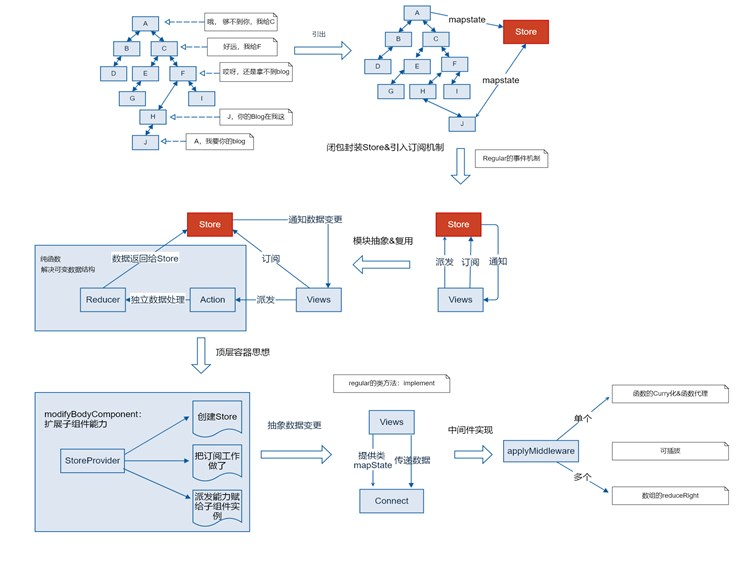
In React or other frameworks, the hierarchical structure of components can make data passing complex, even leading to “data passing black holes.” Redux addresses this issue by introducing a global state management mechanism. Below are the core implementation principles of Redux and the step-by-step process of its incremental improvements.
1. Data Passing Issues 🔗︎
Problem Description 🔗︎
The tree structure of components determines the flow of data, making it difficult to pass data between deep-level components and easily leading to the formation of a “data transfer black hole.”
Solution 🔗︎
Manage shared data centrally through a mediator (Store), allowing all components to retrieve or modify data via the Store.
2. Initial Implementation: A Simple Store 🔗︎
Mediator Implementation 🔗︎
(function createStore() {
var store;
return function() { if (!store) { store = new Regular();
return store;
}; ())
Component A Modifies Data 🔗︎
define([’./store.js’], function(createStore) {
var A = Regular.extend({

        name: "Component A",
        data: {
title: 'Title'
},
        }
        getData: function() {
            this.data.title = createStore().data.title;
        setData: function() {
store.data.title = ‘New Title’; // Notify all other components store.$emit(‘change’, {
                title: 'New Title'
});
});
    return A;
});
### Other Components Listen to Data
define(['./store.js'], function(store) {
    var B = Regular.extend({

},

name: "Component B",
init: function() {
            createStore().$on('change', function(newTitle) {
                this.data.title = newTitle;
            });
});
        }
    return B;
});
## 3. Improvement 1: Separate Data from Store
To prevent direct access and modification of store.data, we separate the data from the Store and retrieve it through interfaces.
(function createStore() {
var store;
return function() {

if (!store) {
            var store = new Regular();
            var state = {};
store.getState = function() { return state; };
store.subscribe = function(listener) { store.$on('change', listener); };
            store.dispatch = function(action) {
        }
                if (action.type == 'changeTitle') {
state.title = action.data.title;
}
store.$emit('change', state);
        };
    return store;
}; })();
4. Improvement 2: Introducing Reducer 🔗︎
Extract the data processing logic from the Store and use a Reducer to manage state updates.

(function createStore(reducer, initState) {

    var store;

    return function() {

if (!store) {
var store = new Regular();
            var state = initState;
            store.getState = function() { return state; };
store.subscribe = function(listener) { store.$on('change', listener); };
store.dispatch = function(action) {
                state = reducer(state, action);
                store.$emit('change', state);
        return store;
};
}
())
Example of Reducer:
function reducer1(state, action) {
switch (action.type) {
case ‘CHANGE_TITLE’:
return Object.assign({}, state, { title: action.data.title });
Default: return state;
5. Improvement 3: Top-level Container and Component Extension 🔗︎
To make it more convenient for components to use the Store, we created a top-level container `StoreProvider` and extended the capabilities of components.
const App = Regular.extend({
name: 'App',
    template: `
<StoreProvider store={store}>
            <A />

<B />

        </StoreProvider>

`,

    config(data) {
data.store = createStore(reducers, { title: "Title" });
};
        }
});
var StoreProvider = Regular.extend({
    template: '{#include this.$body}'
config: function(data) { this.store = data.store; modifyBodyComponent: function(component) {
        component.dispatch = this.store.dispatch.bind(this.store);

this.store.subscribe(function() {
            var state = this.store.getState();
            component.mapState(state);
        }.bind(this));
});
    }
}
6. Improvement 4: Connect Function 🔗︎
To avoid each component needing to manually implement the mapState method, we extracted a connect function.
function connect(config, Component) {
Component.implement({
mapState: function(state) {
const mappedData = config.mapState.call(this, state);
            mappedData && Object.assign(this.data, mappedData);

})

});
connect({
mapState: function(state) {
            title: state.title
};
}, B);
## 7. Middleware Implementation
Middleware is used to insert additional logic in the `dispatch` method, such as logging.
### Initial Implementation

    }
function applyMiddleware(middleware) {
    let store = createStore(reducer1, initState);
    let dispatch = function(action) {
middleware(store.dispatch, action);
return Object.assign({}, store, { dispatch: dispatch });
### Improvement 1: Support for Multiple Middleware
    },

function applyMiddlewares(...middlewares) {

let store = createStore(reducer1, initState);

let dispatch = middlewares.reduceRight((dispatch, middleware) => {

        return middleware(dispatch);

    }, store.dispatch);
return Object.assign({}, store, { dispatch: dispatch });
}
### Middleware Example
function logger(next) {
return function(action) {
console.log(“before dispatch”);
next(action);
console.log(“after dispatch”); };
## 8. Action Creator
Action Creator is an abstraction of the `dispatch` parameter, facilitating reuse.
const CHANGE_TITLE = 'CHANGE_TITLE';
function changeTitle(newTitle) {
type: CHANGE_TITLE,
}
data: { title: newTitle }

}

    };
this.$dispatch(changeTitle('New Title'));
## Summary
        return {
Through the above steps, we have implemented the core functionality of Redux, including:
1. **Store**: Centralized management of application state.
}
2. **Reducer**: A pure function responsible for state updates.
- Connect: Simplify the connection between components and the Store.
Middleware: Enhance
dispatchfunctionality.Action Creator: Abstract Actions, improving code reusability.
};
}
}
```javascript

}
return {
}
New articles on AI agents, full-stack engineering, and a one-person company
I email new writing about AI and agents, full-stack engineering, and building a one-person company. No spam, and you can unsubscribe anytime.