React Common Issues and Solutions
Here is a summary of common issues in React development, including case studies, knowledge summaries, and code examples.
Table of Contents
- Rapid Operations on Slow Networks Cause Form Resets
- Component Fails to Update After Initial Render
- Pure Function Characteristics
- Using useRef
- forwardRef Example
- Closure Reference Issues and useRef Solutions
- React Infinite Render Loop Issues
- Modal Component Cannot Access Global Store
- Difference Between memo and useMemo
- DnDProvider Singleton Pattern
- React Closure Pitfalls
- Tab Rendering Optimization
- When to Use useCallback
- undefined and null in JSX
- Form Losing Focus in Class Components
- Multiple Method Calls Causing Repetitive UI Renders
- React Source Code Learning Resources
- React Task Scheduling and Queues
- Error Boundary
Rapid Operations on Slow Networks Cause Form Resets
Case Description
In a slow network environment, when a user performs rapid operations, changes in the global store (e.g., a global message popup on the right) can trigger the willReceiveProps method, causing the form to be reset (losing user-entered content).
Solution
- Avoid directly resetting the form in
componentWillReceivePropsoruseEffect. - Use controlled components and ensure state synchronization.
- If necessary, save the user’s intermediate input state to prevent data loss due to parent component re-renders.
Component Fails to Update After Initial Render
Case Description
Some components are passed an empty array or other initial values on the first render, and they fail to update correctly when real data is subsequently passed in.
Solution
- Ensure that a change in the component’s
propstriggers a re-render. - Use a
keyto force the component to re-render:<MyComponent key={someUniqueKey} data={data} />
Pure Function Characteristics
Summary of Characteristics
- Same input, always the same output: The same input will not affect the results of other calls due to call order or parameter changes.
- No re-render if reference is unchanged: React will not re-render a component if its
propsreference has not changed.
Using useRef
Points to Note
ref.currentis a plain JavaScript object, isolated from the outside, and does not trigger component re-renders.- Do not read or write to
refduring rendering:// Incorrect example function MyComponent() { myRef.current = 123; return <h1>{myRef.current}</h1>; }
forwardRef Example
const MyInput = forwardRef((props, ref) => {
  return <input {...props} ref={ref} />;
});

const App = () => {
  const inputRef = useRef(null);
  return <MyInput ref={inputRef} />;
};
Closure Reference Issues and useRef Solutions
Case Description
Unable to get the latest state value in the modal’s onOk method.
Solution
Solve the closure reference issue using useRef:
const latestValueRef = useRef();
latestValueRef.current = value;

const handleOk = () => {
  console.log(latestValueRef.current); // Get the latest value
};
React Infinite Render Loop Issues
Case Description
An operation causes a component to re-render repeatedly, eventually leading to the DOM node being removed.
Solution
- Check if
setStateis called within a conditional statement. - Avoid directly modifying dependencies within
useEffect.
Modal Component Cannot Access Global Store
Case Description
Components rendered via Dialog.confirm cannot use store.useModel('user').
Root Cause Analysis
The modal component is not injected with the Provider context.
Solution
Ensure the modal component is wrapped within a Provider:
onClick: () => {
  Dialog.confirm({
    content: (
      <Provider>
        <CustomeComponent />
      </Provider>
    ),
  });
};
Difference Between memo and useMemo
Summary of Differences
- useMemo: Memoizes a value, recalculating it only when dependencies change.
- React.memo: Controls whether a component re-renders, executing only when
propschange.
Example Code
const CustomInput = React.memo(
  (props) => {
    console.log("rerender", props.name);
    return <Input {...props} />;
  },
  (prevProps, nextProps) => prevProps.value === nextProps.value
);

const CacheInput = (props) => {
  return <CustomInput {...props} />;
};
DnDProvider Singleton Pattern
import { DragDropContext } from 'react-dnd';
import HTML5Backend from 'react-dnd-html5-backend';

export const MyDndProvider = DragDropContext(HTML5Backend)(({ children }) => {
  return children;
});
React Closure Pitfalls
Recommendation
Use the functional form of setState(list => list) to access the list, rather than accessing it directly via a closure.
Tab Rendering Optimization
Optimization Strategy
- Only update the component when switching tabs, not on every input change.
- Use
unmountInactiveTabsor conditional rendering to avoid multiple renders of expensive components.
When to Use useCallback
Use Cases
- When a callback function is passed to a child component that uses
React.memo. - When a callback function is a dependency of
useEffectoruseMemo.
undefined and null in JSX
- undefined: Will cause a JSX error.
- null: Renders as empty content without errors.
Form Losing Focus in Class Components
Root Cause Analysis
A new function is created on every render, causing the component to re-render.
Solution
Define the function as a class member method to avoid creating a new one on each render.
Multiple Method Calls Causing Repetitive UI Renders
Case Description
Calling the same method multiple times causes multiple identical items to appear in the UI.
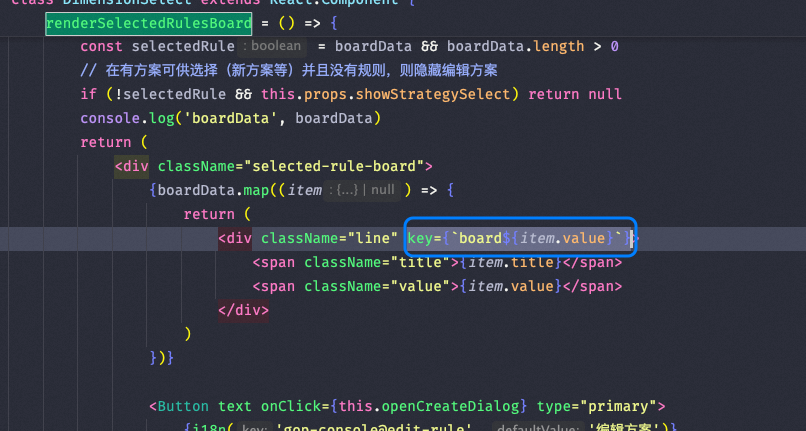
Solution
Check the method call logic to ensure it is only called once.
React Source Code Learning Resources
React Task Scheduling and Queues
React 18 introduces a new task scheduling mechanism that supports concurrent rendering and priority management.
Error Boundary
error-boundary implements component-level error catching.
Offscreen Optimization
https://react.dev/blog/2022/06/15/react-labs-what-we-have-been-working-on-june-2022#offscreen
References
- React Error Boundaries Documentation — Official documentation for Error Boundaries in React
- Common React Mistakes — Josh W. Comeau — Guide to common React pitfalls and how to avoid them
- React Re-renders Guide — Developer Way — Understanding when and why React components re-render
- React Children Type Checking Pitfall: Why Function Children Don’t Render — From this blog: how mixed JSX turns children from a function into an array and breaks typeof checks, with three fixes
New articles on AI agents, full-stack engineering, and a one-person company
I email new writing about AI and agents, full-stack engineering, and building a one-person company. No spam, and you can unsubscribe anytime.