Node.js Case Studies
Node.js Debugging
1. Debugging Steps
Step 1: Start the Inspector
Use nodemon to start in debug mode:
nodemon --inspect-brk xx.js
Example output:
[nodemon] starting `node --inspect-brk /Users/maoxunxing/alibaba/vite-comp/bin/index.js`
Debugger listening on ws://127.0.0.1:9229/b789951b-b593-482e-a365-575f547e3fc3
For help, see: https://nodejs.org/en/docs/inspector
Debugger attached.
Step 2: Enable Listening in Chrome
- Open the Chrome browser and navigate to the following address:
chrome://inspect/#devices - Configure the debugging address to
127.0.0.1:9229. - Click the Inspect button to enter the debugging interface.
2. More Advanced Topics
Refer to the official documentation for more debugging techniques and configuration methods:
Node.js Case Studies
<ref *1> Error: connect ECONNREFUSED 127.0.0.1:7001 at TCPConnectWrap.afterConnect [as oncomplete] (node:net:1247:16) { errno: -61, code: 'ECONNREFUSED', syscall: 'connect', address: '127.0.0.1',
This error occurs when starting a local Node.js service. It’s not because the port is occupied, but because the Node.js version is incorrect. Using version 14 works.
Specify Node.js version in WebStorm: WebStorm Node Version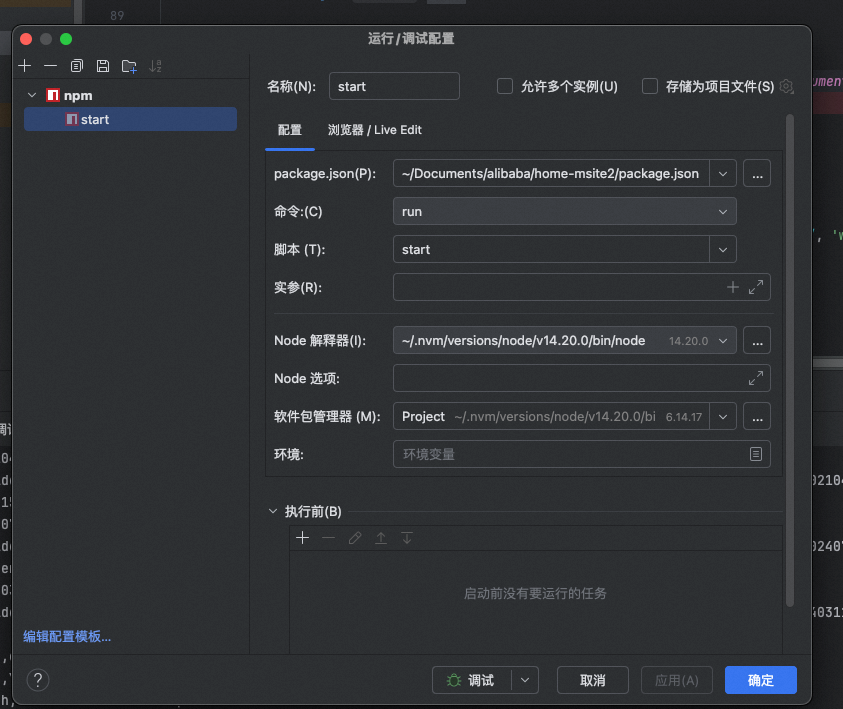
{
    // Use IntelliSense to learn about possible attributes.
    // Hover to view descriptions of existing attributes.
    // For more information, visit: https://go.microsoft.com/fwlink/?linkid=830387
    "version": "0.2.0",
    "configurations": [
        {
            "type": "node",
            "request": "launch",
            "name": "Launch Program",
            "skipFiles": [
                "<node_internals>/**"
            ],
            "program": "${workspaceFolder}/src/node.js"
        }
    ]
}
NodeParty Notes
1. Testing and Tools
Fixtures
- Definition: Fixtures are integrated debugging data used for data preparation and simulation in a test environment.
Marmot
- Purpose: CI/CD toolchain.
- Features:
- Provides a high-efficiency development process.
- Supports Node BFF (Backend For Frontend) services to improve front-end development efficiency.
JSON Schema Protocol
- Definition: A protocol used to describe the structure of JSON data.
- Application: Often used for API definition and validation.
2. Teams and Projects
Xudafeng (徐达峰)
- Contributions:
- Open-source project contributor, driving the development of front-end technology.
- Related projects include
apfe-ciandamur graphql.
Ant Design
- Positioning: A UI component library for business-oriented applications.
- Features:
- High Reusability: Provides a complete toolchain and JS-SDK.
- Rich Scenarios: Supports complex business scenarios.
3. Front-End Complexity and Solutions
Manifestations of Front-End Complexity
- Mainly reflected in diverse business scenarios.
- Solutions:
- Use highly reusable toolchains (e.g.,
apfe-ci). - Introduce Node BFF services to reduce front-end and back-end coupling.
- Use highly reusable toolchains (e.g.,
Cross-Platform Development
- Challenges:
- Updating large objects can cause performance issues.
- Compatibility between different platforms.
- Solutions:
- Use a virtual DOM (e.g.,
vm-vdom-page-view) for optimization. - Add flags in the DOM to distinguish between different states.
- Use a virtual DOM (e.g.,
4. Permissions and Security
Permission Management
- Two Types:
- API-Level Permissions: Control interface access.
- Field-Level Permissions: Fine-grained control over data field access.
- Implementation:
- Use Sessions or Tokens for authentication.
- Permission management is usually targeted at SPAs (Single Page Applications).
5. Real-Time Monitoring and Animation
Chameleon
- Function: A real-time monitoring system to help quickly discover and resolve issues.
Animation Engine
- Role: Enhance user experience through interactive innovation.
- Application Scenarios: Animation effects in complex interactive scenarios.
6. Technical Frameworks and Protocols
Service Mesh
- Definition: A microservices architecture pattern for inter-service communication.
- Related Technology:
sofa-rpc-node.
Amur GraphQL
- Features:
- Provides a flexible way to define APIs.
- Supports complex data queries and operations.
Scheme API Definition
- Background: Can generate multiple nested requests.
- Advantages: Improves the flexibility and reusability of interfaces.
7. Performance Optimization
QPS (Queries Per Second)
- Definition: Queries Per Second, an important metric for measuring system performance.
- Optimization Directions:
- Reduce unnecessary requests.
- Use caching mechanisms.
TWA (Trusted Web Activity)
- Purpose: To achieve a smoother web application experience on the Android platform.
- Advantages: Improves performance and consistency in cross-platform development.
8. Other Technical Points
Alipay App in Each Country
- Features:
- Customized development according to the needs of each country.
- Supports localized payment and financial services.
SDK Documentation and Development
- What Programmers Focus On:
- Clear documentation.
- Easy-to-use development tools.
Team Tool Accumulation
- Practice: Gradually accumulate and improve the toolchain based on business needs.
References
- Debugging Node.js with Chrome DevTools — Official guide to debugging Node.js with Chrome Inspector
- Node.js Debugging Guide — JetBrains — Comprehensive Node.js debugging setup guide
- NDB: Chrome DevTools for Node — Google — Improved debugging experience for Node.js
New articles on AI agents, full-stack engineering, and a one-person company
I email new writing about AI and agents, full-stack engineering, and building a one-person company. No spam, and you can unsubscribe anytime.