Cross-Terminal Development and Dynamic Practices
In modern front-end development, cross-terminal development and dynamic capabilities are crucial for improving development efficiency and optimizing user experience. This article will discuss topics such as data delivery and module publishing, module system layering, responsive design, platform-specific builds, and dynamic technologies, providing detailed analysis and organization.
Table of Contents
- Cross-Terminal Development Overview
- Three-Layer Structure of Data Sources
- Module System Layering
- Responsive Design
- Platform-Specific Builds
- Dynamic Technologies
- Performance Metrics
- Conclusion
Cross-Terminal Development Overview
The core goal of cross-terminal development is to use a single codebase to adapt to multiple platforms, including H5, PC, and mini-programs. The key lies in modular design, optimization of data delivery and publishing processes, and support for dynamic capabilities.
Three-Layer Structure of Data Sources
In cross-terminal development, the design of data sources is typically divided into the following three layers:
1. Atomic Model
- Definition: Basic fields that describe the lowest-level data units.
- Characteristics:
- Independent of specific business scenarios.
- Highly reusable, suitable for sharing across terminals.
- Examples: User ID, product name, price, etc.
2. Business Model
- Definition: Aggregates fields from the atomic model to form data structures related to business logic.
- Characteristics:
- Designed for specific business scenarios.
- Provides a higher level of abstraction to facilitate business development.
- Example: Shopping cart model (including product list, total price, discount information, etc.).
3. Model Instance
- Definition: Instantiated from a business model to generate specific data objects.
- Characteristics:
- Dynamically generated, suitable for runtime data processing.
- Supports multi-terminal adaptation; instantiation logic can be adjusted based on the needs of different terminals.
- Example: A specific user’s shopping cart instance.
Module System Layering
The design of the module system is fundamental to cross-terminal development and is usually divided into the following two layers:
1. Atomic Components
- Definition: Basic components encapsulated based on Rax (a cross-terminal implementation of React).
- Characteristics:
- Provide common capabilities such as tracking, terminal detection, and language support.
- The technology container encapsulates fundamental cross-terminal capabilities, simplifying the development process.
- Examples: Button component, Input component.
2. Business Modules
- Definition: Business logic modules built on top of atomic components.
- Characteristics:
- Designed for specific business scenarios.
- Include a Schema definition to describe the module’s configuration (e.g., data, internationalization, themes).
- Examples: Product details module, Order confirmation module.
Responsive Design
Responsive design is a crucial part of cross-terminal development, ensuring that pages display well on different devices. Its core includes:
- Layout Adaptation: Using techniques like Flexbox and Grid layout to ensure pages adapt to different screen sizes.
- Media Queries: Adjusting styles based on device characteristics (such as screen width and resolution).
- Dynamic Units: Using
remorvw/vhunits to enhance adaptation flexibility.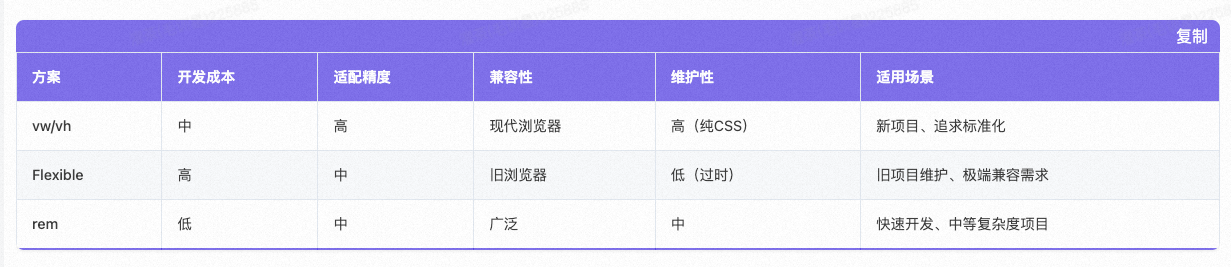
Platform-Specific Builds
Platform-specific builds refer to generating specific code packages for different terminals (such as H5 and PC) to meet their respective performance and functional requirements.
1. H5/PC Builds
- H5: Focuses on being lightweight and performance-optimized, suitable for mobile access.
- PC: Emphasizes interactive experience and support for complex features, suitable for desktop use.
2. Proxy Tools
- Shanhaiguan: A commonly used proxy tool for debugging and optimizing cross-terminal requests.
- Functions:
- Centralized management of API requests.
- Supports mock data, facilitating development and testing.
Dynamic Technologies
Dynamic technologies are key in cross-terminal development, enhancing application flexibility and update efficiency.
1. DSL Dynamic Container
- Definition: Describes UI structure and logic using a DSL (Domain-Specific Language).
- Characteristics:
- Supports dynamic delivery and updates, reducing the frequency of releases.
- Example: DX (Dynamic Container Framework).
2. Limitations of H5
- Problem: In some scenarios, H5 has a “not-following-the-hand” issue, meaning the interactive experience is not smooth enough.
- Solutions:
- Use a dynamic container (like DX) to replace pure H5 implementations.
- Optimize animations and gesture interactions to improve user experience.
Performance Metrics
Time to Interactive (TTI) for the first screen, generally onLoad is not used.
Rendering Origin Design
References
- React Native Documentation — Official React Native documentation for cross-platform development
- Flutter Documentation — Official Flutter documentation for multi-platform UI development
- Responsive Web Design — MDN — Guide to responsive design principles and techniques
New articles on AI agents, full-stack engineering, and a one-person company
I email new writing about AI and agents, full-stack engineering, and building a one-person company. No spam, and you can unsubscribe anytime.